How Secure Are Claude Managed Agents?

In April 2026, Anthropic released Claude Managed Agents as a public beta.
Introducing Claude Managed Agents: everything you need to build and deploy agents at scale. It pairs an agent harness tuned for performance with production infrastructure, so you can go from prototype to launch in days.
Running AI agents in production requires a lot of work. You need to build an agent loop, set up a sandbox, prepare tool execution infrastructure, and manage credentials. Managed Agents handles all of this as a hosted service from Anthropic, so you can run long-running tasks and async workloads safely without building your own infrastructure.
With a single API call, you get an environment where Claude can read and write files, run shell commands, search the web, and connect to external services through MCP servers.
Anthropic's engineering blog "Scaling Managed Agents: Decoupling the brain from the hands" covers the architecture and design decisions in detail.
Architecture Components
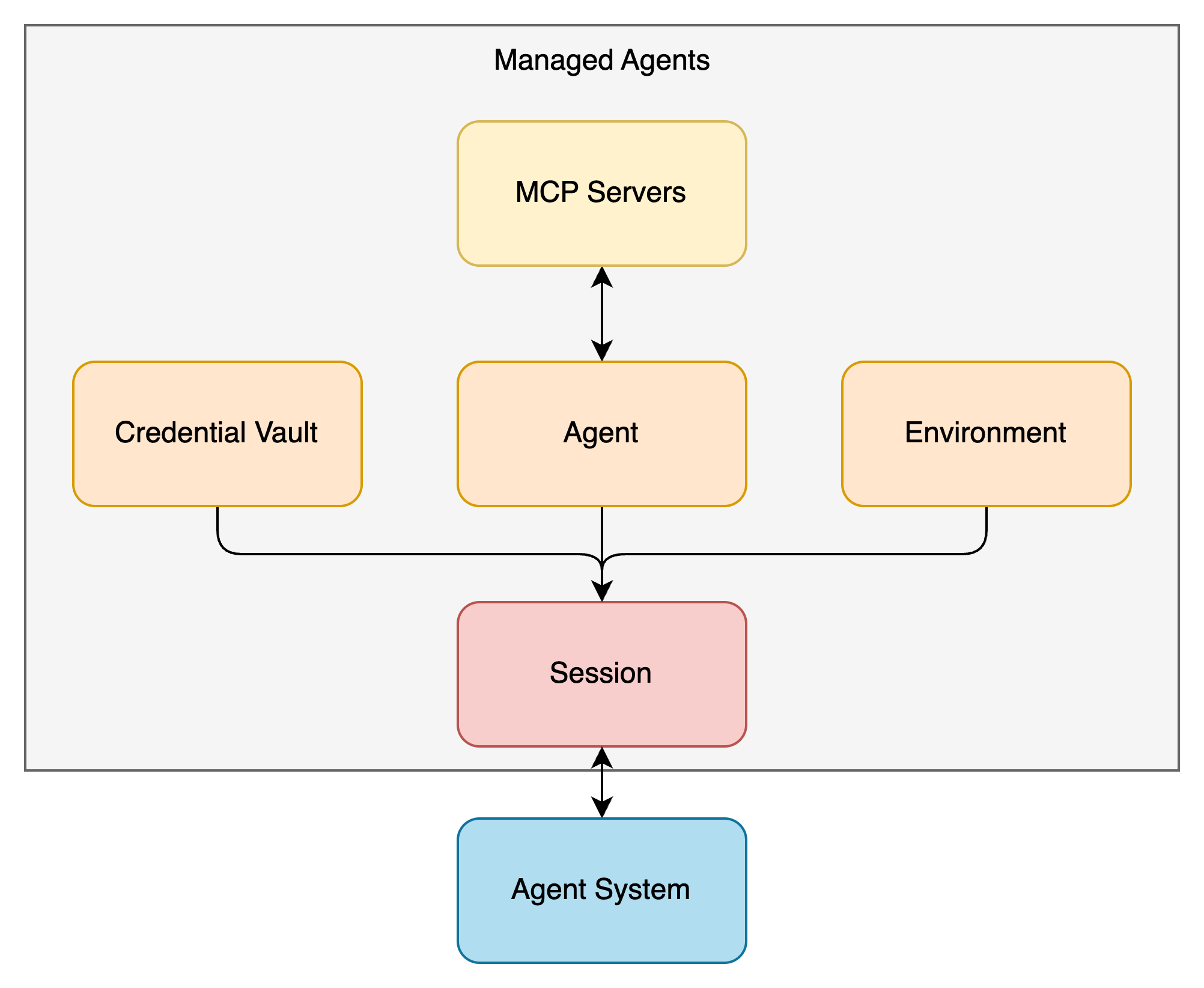
Managed Agents is built from four components.
Agent
The Agent component defines what your agent can do.
- Which model to use (e.g., claude-sonnet-4-6)
- The system prompt
- Available tools (built-in toolset or custom tools)
- Which MCP servers to connect to
- Agent Skill
The built-in toolset agent_toolset_20260401 enables eight tools: bash, read, write, edit, glob, grep, web_fetch, and web_search. You can disable individual tools, or flip the default off with default_config.enabled: false and enable only the ones you need.
agent = client.beta.agents.create(
    name="Coding Assistant",
    model="claude-sonnet-4-6",
    system="You are a helpful coding assistant.",
    tools=[
        {
            "type": "agent_toolset_20260401",
            "default_config": {"enabled": False},
            "configs": [
                {"name": "bash", "enabled": True},
                {"name": "read", "enabled": True},
                {"name": "write", "enabled": True},
            ],
        },
    ],
)
Once created, an Agent gets an ID that you can reuse across multiple sessions.
Environment
An Environment is a container template for the agent's execution.
- Pre-installed packages (pip, npm, apt, cargo, gem, go)
- Network access controls
Packages are installed before the session starts and cached across sessions that share the same Environment.
Networking has two modes: unrestricted (the default, full access) and limited. In limited mode, you specify allowed destinations with allowed_hosts.
environment = client.beta.environments.create(
    name="secure-env",
    config={
        "type": "cloud",
        "packages": {
            "pip": ["pandas", "numpy"],
            "apt": ["ffmpeg"],
        },
        "networking": {
            "type": "limited",
            "allowed_hosts": ["api.example.com"],
            "allow_mcp_servers": True,
            "allow_package_managers": True,
        },
    },
)
Setting allow_mcp_servers to True allows traffic to the MCP servers configured on the Agent. Setting allow_package_managers to True allows access to package registries like PyPI and npm. Both default to False.
Multiple sessions referencing the same Environment each get their own isolated container instance. File system state is not shared between sessions.
Session
A Session combines an Agent and an Environment to run a task.
You specify the Agent ID and Environment ID when creating a session, then send user messages as events. Claude picks and runs tools on its own to complete the task. Results stream back in real time through Server-Sent Events (SSE).
session = client.beta.sessions.create(
    agent=agent.id,
    environment_id=environment.id,
    vault_ids=[vault.id],
    title="Alice's task",
)
By passing vault_ids at session creation, you can use credentials stored in a Credential Vault for MCP server connections.
Event history is saved on the server side, so you can always pull the full event log. This is a big win for observability.
Credential Vault
A Credential Vault stores the authentication information needed for MCP server connections.
A Vault can hold two types of credentials:
static_bearerfor fixed tokens like API keys or personal access tokensmcp_oauthfor OAuth access tokens and refresh tokens
With mcp_oauth, if you register a refresh token and token endpoint, Anthropic handles access token renewal automatically.
vault = client.beta.vaults.create(
    display_name="Alice",
    metadata={"external_user_id": "usr_abc123"},
)

credential = client.beta.vaults.credentials.create(
    vault_id=vault.id,
    display_name="Alice's Slack",
    auth={
        "type": "mcp_oauth",
        "mcp_server_url": "https://mcp.slack.com/mcp",
        "access_token": "xoxp-...",
        "expires_at": "2026-04-15T00:00:00Z",
        "refresh": {
            "token_endpoint": "https://slack.com/api/oauth.v2.access",
            "client_id": "1234567890.0987654321",
            "scope": "channels:read chat:write",
            "refresh_token": "xoxe-1-...",
            "token_endpoint_auth": {
                "type": "client_secret_post",
                "client_secret": "abc123..."
            },
        },
    },
)
Vaults have a few constraints like Only one active credential per mcp_server_url per Vault.
Credentials are re-resolved during a running session, so token rotations take effect without restarting the session.
How the Components Fit Together
| Component | Role | Lifecycle |
|---|---|---|
| Agent | Defines the model, prompt, tools, Skill, and MCP servers | Created once, reused across sessions |
| Environment | Container template (packages, networking) | Created once, reused across sessions |
| Session | Running instance of Agent + Environment | Created per task |
| Credential Vault | Stores MCP server credentials | Linked at session creation |
Agent and Environment are reusable templates. Session is the running instance that combines them. Credential Vault is linked at session creation by passing Vault IDs, which allows MCP server authentication to happen transparently.
Brain and Hands: The Split Architecture
The engineering blog goes deep into the internal design of Managed Agents.
The Pet vs Cattle Problem
The first version of Managed Agents put all agent components inside a single container. File edits were direct system calls, and there was no need to design service boundaries. Simple.
But this design had a fatal flaw. When a container crashed, the entire session was lost. Unresponsive containers needed manual recovery work, and the only debugging window was the WebSocket event stream.
To fix this, the architecture was split into "Brain" and "Hands."
What Brain and Hands Do
- Brain: The harness that runs Claude's model inference and routes tool calls. It runs outside the container.
- Hands: The execution environment that runs commands in the sandbox and communicates with MCP servers. All Hands are called through a single interface:
execute(name, input) → string.
When a container goes down, the Brain reports a tool call error back to Claude. The session itself isn't lost. A new container can be spun up with provision({resources}) as needed.
Credential Isolation
This is the most important part from a security perspective.
In the original coupled design, untrusted code generated by Claude ran in the same container as the credentials. A Prompt Injection attacker only had to read environment variables to steal tokens.
The split architecture changes this completely.
For Git authentication, repository access tokens are used at sandbox initialization time to clone the repo and are embedded in the local git remote. The agent doesn't handle the token directly when running git push or git pull.
For OAuth authentication, tokens are stored in the Credential Vault. Claude calls MCP tools through a dedicated proxy, and the proxy fetches tokens from the Vault associated with the session to make requests to external services. The Brain never sees any credentials.
In other words, code running inside the sandbox simply has no way to access credentials. This eliminates the risk of Prompt Injection-based token theft by design.
Security Review
I reviewed Managed Agents' security using the framework from my February post "Action Items for Agent Platform Security," going through each category.
Sandbox
Each session gets its own isolated container instance in the cloud. Even sessions that reference the same Environment don't share file system state. A file created in one session can't be read from another.
This limits the files and processes an agent can touch to a specific scope. It prevents one user's session from interfering with another user's session or leaking sensitive data between sessions.
AI agents generate and execute code, which means unintended file creation, modification, or deletion can happen. Per-session isolation contains this impact as a basic defense layer.
Network Controls
The Environment's networking settings control outbound traffic.
The default unrestricted mode allows full access except for a safety blocklist. For production, limited mode is recommended, where you specify allowed destinations with allowed_hosts.
"networking": {
    "type": "limited",
    "allowed_hosts": ["api.example.com", "github.com"],
    "allow_mcp_servers": True,
    "allow_package_managers": False,
}
Setting allow_package_managers to False blocks the agent from connecting to package registries to install libraries. This helps against supply chain attacks like slopsquatting, where an AI installs a package with a similar-sounding but malicious name.
Network controls also help block indirect Prompt Injection paths. When an agent fetches an external web page, that page might contain hidden malicious instructions that try to make the agent send data to an attacker-controlled server. Restricting outbound destinations reduces this risk.
Credential Isolation
As described above, credentials stored in Credential Vault are fully separated from the sandbox.
- An admin stores MCP server credentials in a Credential Vault
- The session is created with a Vault ID
- The agent calls an MCP tool
- A dedicated proxy fetches credentials from the Vault and sends the request to the MCP server
- The result comes back to the agent
At no point does the agent or its code inside the sandbox touch any credentials. There are no tokens in environment variables or on the file system.
One gap: there's no way to restrict OAuth scopes through Credential Vault. If a Slack OAuth token has both channels:read and chat:write scopes, you can't narrow it down to just channels:read at the Vault level. Scope restriction needs to happen at the OAuth client configuration stage.
Least Privilege
MCP server tools support three levels of access control per tool:
allowed_toolsfor tools the agent can call freelyuser_approved_toolsfor tools that need human approval each timedenied_toolsfor tools the agent can never call
For a Notion MCP server, you might always allow page reads (notion-fetch), require human approval for page creation (notion-create-pages), and block page deletion entirely.
This lets you build a "read-only agent" by putting all write-capable tools into denied_tools. For agents that only browse and analyze data, removing write access cuts the risk of accidental changes and data leaks.
Built-in tools can also be toggled individually through agent_toolset_20260401. Disabling web_fetch and web_search blocks external content retrieval and shrinks the Prompt Injection attack surface.
Observability
Managed Agents keeps detailed session history.
Beyond the human-agent conversation (user messages and agent responses), the debug tab records every tool call with its arguments and results. You can see exactly which files the agent wrote, which bash commands it ran, and what parameters it passed to MCP tools.
This is very useful for post-incident investigation. You can reconstruct the full timeline of what triggered what.
But there's no runtime security monitoring inside the sandbox. By runtime security, I mean process-level monitoring with tools like Falco.
Say an agent installs a Python package and accidentally picks a malicious package with a similar name (slopsquatting). That package contains a backdoor that starts a suspicious process inside the sandbox, tries to access local files, and attempts to send data to an external server. Network controls might block the outbound traffic. But there's no way to record what that process executed, which files it accessed, or what it tried to do at the system call level.
On your own servers, you could deploy Falco or eBPF-based monitoring tools. But since Managed Agents runs on Anthropic's infrastructure, you can't install these yourself. This needs platform-level support.
Prompt Filtering
For defending against Prompt Injection and Agent Goal Hijacking (attacks that rewrite what the agent is trying to do), you'd want to filter both input and output with tools like Model Armor.
The OWASP Top 10 for Agentic Applications 2026 now lists Agent Goal Hijacking as a top threat, replacing Prompt Injection. The attack works by embedding malicious instructions in the agent's interactions to redirect its goals.
With Managed Agents, you can filter user input yourself. Just route events through your own proxy before sending them to the session and block anything suspicious.
But there's no way to filter agent output. When the agent processes tool results or web page content that contains malicious instructions and produces inappropriate output, the API structure makes it hard to intercept. I hope guardrails that cover both input and output will be added in the future.
Summary
| Security Control | Status | Notes |
|---|---|---|
| Sandbox | ○ | Isolated container instance per session |
| Network Controls | ○ | Limited mode with explicit allowed hosts, package registry control |
| Credential Isolation | ○ | Credential Vault + dedicated proxy, fully isolated from sandbox |
| Least Privilege | ○ | Per-tool allowed/denied/user_approved controls for MCP tools |
| Observability | △ | Detailed tool call logs, but no runtime monitoring |
| Prompt Filtering | △ | Input filtering possible via proxy, output filtering not available |
| Runtime Security | × | No process monitoring in sandbox, can't be added by users |
The core security controls are solid. Credential Vault's isolation of credentials from the sandbox stands out. It removes any path from agent-executed code to credentials by design.
For runtime security, since Anthropic hosts the environment, you can't deploy process monitoring tools like Falco yourself. This needs platform-side action. For prompt filtering, you can handle the input side with your own proxy, but filtering agent output isn't possible yet given the API structure.
For the controls you can configure, use them aggressively and cut unnecessary attack surface. Start with limited networking and a minimal tool set in production.
Confused Deputy Problem
But when you try to run this in a multi-user environment, you hit a big problem: the Confused Deputy Problem.
What Is the Confused Deputy Problem?
The Confused Deputy Problem is a classic security issue where a program accidentally uses someone else's authority instead of its own.
In the Managed Agents context, this means an agent that should be operating with User A's permissions ends up using User B's credentials to access external services.
How It Shows Up in Managed Agents
When you save credentials to a Credential Vault, Claude Console shows this warning:
This credential will be shared across this workspace. Anyone with API key access can use this credential in an agent session to access the service associated with the credential - including reading data and taking actions on behalf of the credential owner.
As it says, stored credentials are shared across the entire workspace. Anyone with API key access can use those credentials in a session.
Here's a concrete scenario:
- Alice opens Claude Console and saves her Notion access token in Credential Vault A
- Bob also opens Claude Console and saves his Notion access token in Credential Vault B
- When Bob creates a session, he specifies Alice's Vault A in
vault_idsinstead of his own Vault B - The agent in that session accesses Notion with Alice's permissions
Bob can now freely read and modify Alice's Notion workspace through the agent, even though he shouldn't have access to it.
Why This Is Serious
In an organization, users have different permissions.
Engineers shouldn't see HR's personnel records. IR teams shouldn't modify the services that engineers manage. Sales teams don't need access to internal development repositories.
These access boundaries already exist in each service (Notion, Slack, GitHub, etc.) through their own access controls. When agents connect to these services, they need to faithfully reflect each user's permissions. If someone can use another person's credentials, it goes around all the existing access controls.
The Right Approach
Don't let end users directly access Claude Console. Since anyone with Console access can use any Vault, only admins should touch the Console. End users need a separate interface that only lets them register their own credentials.
Managed Agents currently has no built-in mechanism to prevent this Confused Deputy Problem.
Credential Management Interface
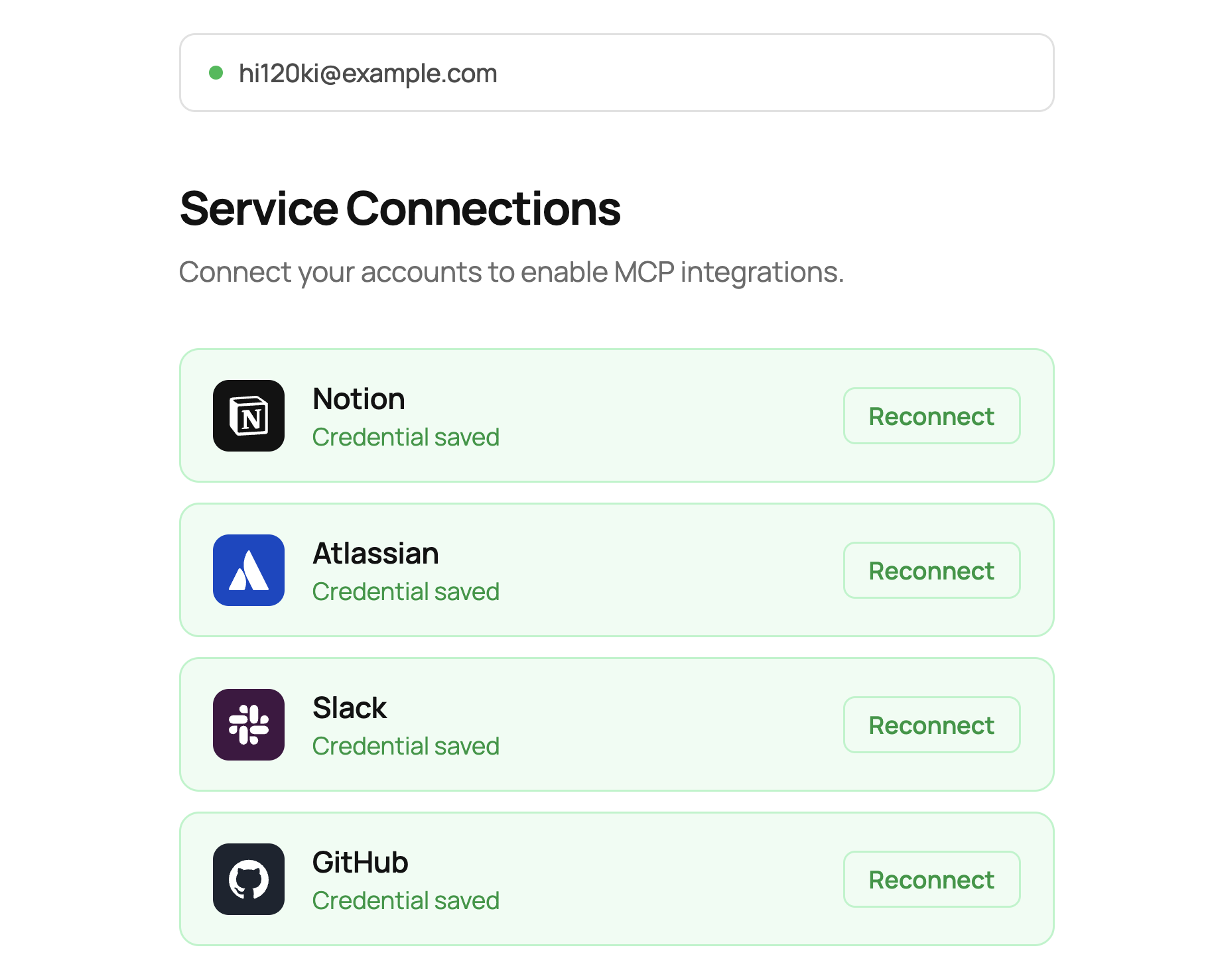
To solve this, I'm releasing an open-source interface for managing Credential Vault safely in multi-user environments.
hi120ki/managed-agents-interface
Design Approach
The idea is simple:
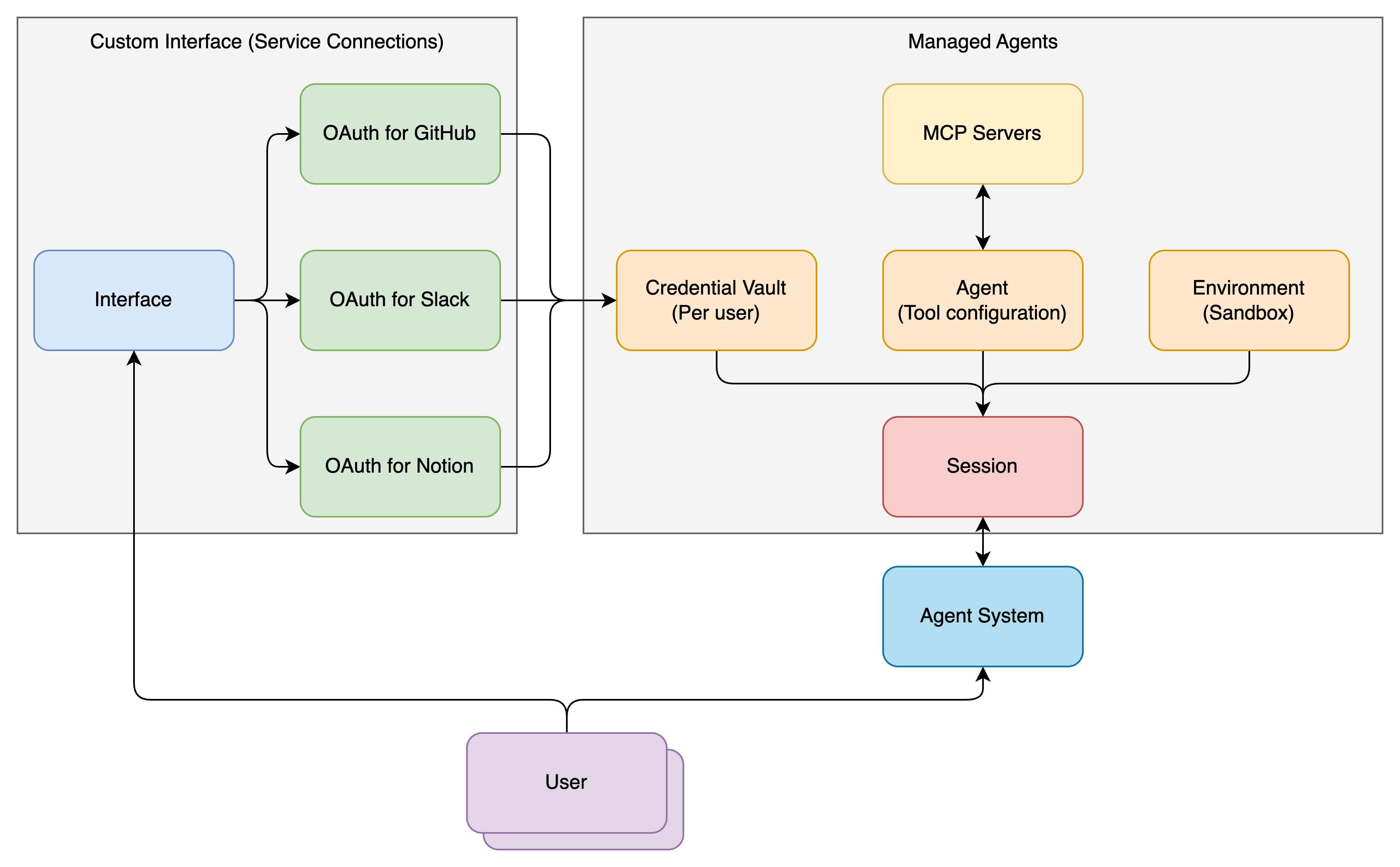
- Restrict Claude Console access to agent admins only
- Give users a separate interface, not Claude Console
- That interface only allows users to create and update their own credentials
End users never need to access Claude Console, and they never directly touch the Credential Vault. From their perspective, they just click an OAuth button for each service to grant permissions.
How It Works
- The user authenticates through Google Cloud IAP (Identity-Aware Proxy). IAP is Google Cloud's application-level authentication layer that transparently identifies users on every request.
- The authenticated user sees buttons for each service: Notion, Slack, GitHub, Atlassian, and others.
- Clicking a button starts the OAuth flow. Behind the scenes, this uses Dynamic Client Registration (DCR) on MCP servers for automatic OAuth client registration, or pre-configured OAuth clients.
- After the OAuth flow completes, the access token and refresh token are automatically stored in the Credential Vault API through the Anthropic SDK. The Vault's displayName uses the user identifier from IAP, keeping the user-to-Vault mapping clear.
- When creating an agent session, the system identifies the user, looks up the matching Vault through the Credential Vault API, and passes it to
vault_ids.
The Credential Vault API lets you store arbitrary data in the Vault's metadata field, like external user IDs. We can use this field for the user-to-Vault mapping.
The Token Vault Concept
A system that manages and stores per-user credentials like this is commonly called a Token Vault.
In large organizations, each user has different permissions, and those permission boundaries need to be accurately reflected in the agent. The Token Vault's job is to make sure each user only operates the agent with their own permissions and can't access anyone else's.
Anthropic's Credential Vault API works well as the storage layer for a Token Vault. But access control in multi-user environments is something you need to build on top of the API. The interface I'm releasing is one implementation of that.
What's Next
This interface handles the Confused Deputy Problem, but there are still missing pieces before organizations can fully adopt Managed Agents.
For cost management, you need to track who used which agent and how much. Session metrics like token consumption and tool call counts are available, but building the infrastructure to aggregate these per user and allocate costs across teams or projects is on you.
For auditing, you need a way to accurately collect and analyze session logs showing who used agents, when, and how. Session history is available through the API, but tooling for searching and analyzing large numbers of sessions across the organization isn't there yet.
I'm hoping these supporting features for agent adoption will be added to the platform over time. I'd be happy if this open-source project helps others get started with Managed Agents.
References
- Scaling Managed Agents: Decoupling the brain from the hands - Anthropic Engineering Blog
- Claude Managed Agents Overview - Claude Platform Docs
- Quickstart - Claude Platform Docs
- Cloud environment setup - Claude Platform Docs
- Tools - Claude Platform Docs
- Authenticate with vaults - Claude Platform Docs
- Action Items for Agent Platform Security - hi120ki blog
- @claudeai - Managed Agents announcement